Neonfade: A Futuristic Display Font for Makers
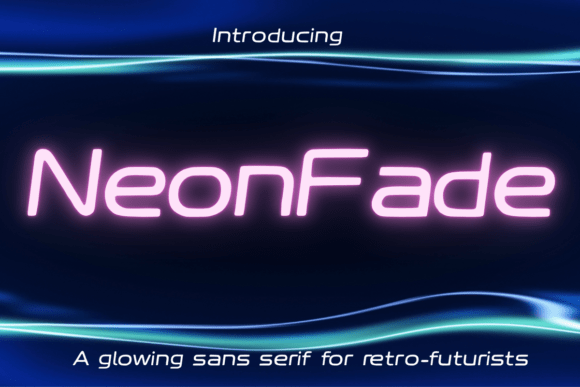
When I sat down at my design tablet last Tuesday, the glow of the screen was the only light in my studio. I was struggling to find the right Fonts for a new line of synthwave-inspired vinyl stickers I planned to list in my shop. Most typefaces felt too rigid or too traditional for the electric, retro-futuristic vibe I wanted to capture. That is when I discovered Neonfade, a futuristic sans serif display font featuring glowing edges and soft gradient-inspired strokes. It immediately transformed my flat vector shapes into something that felt alive, pulsing with the same energy as the neon signs in the reference photos on my desk. For any crafter or digital creator looking to inject modern typography into their work, this Display typeface offers a unique visual personality that stands out in a crowded marketplace.
Using Neonfade for Synthwave Visuals and Vaporwave Edits
The primary appeal of Neonfade lies in its ability to mimic the aesthetic of illuminated signage without requiring complex layer effects in your design software. As a maker who frequently creates digital posters and social media graphics, I found that this font does the heavy lifting for you. The glowing edges are not just a gimmick; they provide a natural depth that makes text pop against dark backgrounds. When designing vaporwave edits or YouTube thumbnails, readability is often sacrificed for style, but Neonfade balances both. The soft gradient-inspired strokes ensure that the letters remain distinct even when scaled down for mobile viewing. This makes it an ideal choice for creators who need their brand identity to feel cohesive across different platforms, from Instagram stories to printable wall art.
Designing Eye-Catching YouTube Thumbnails with Neonfade
If you are a content creator or a seller using video to showcase your handmade goods, your thumbnail is your storefront window. Using Neonfade for titles in these thumbnails can significantly increase click-through rates by drawing the eye immediately. The futuristic sans serif structure ensures that short, punchy phrases remain legible, while the glowing effect adds a premium feel that suggests high-quality content. I tested this by creating a series of mockups for a tutorial on making resin jewelry. The contrast between the bright, neon-infused text and the muted tones of the workspace background created a striking visual hierarchy. It signaled to viewers that the content was modern, energetic, and professionally produced, all through the simple choice of a single Display font.
Neonfade for Digital Posters and Printable Wall Art
For those of us who sell digital downloads, the versatility of our Fonts determines the range of products we can offer. Neonfade excels in the realm of digital posters, particularly for niche audiences who appreciate retro-futurism and cyberpunk aesthetics. I recently designed a set of printable wall art pieces featuring motivational quotes for home offices. The soft gradient-inspired strokes of Neonfade allowed me to create a sense of movement and light within the static image. Customers are often drawn to prints that feel like they emit their own light, and this typeface delivers that illusion effortlessly. When preparing these files for sale, it is crucial to ensure that the glowing edges do not blur during the printing process if a customer chooses to print them physically. Testing different resolutions and color profiles helped me determine the best settings for maintaining the integrity of the design.
Creating Cohesive Brand Identity with Display Typography
Beyond individual products, Neonfade can serve as a cornerstone for your shop’s brand identity. Consistency is key in building customer recognition, and using a distinctive Display font across your packaging, labels, and online presence creates a memorable impression. I incorporated Neonfade into my thank-you cards and package inserts for my sticker orders. The futuristic look contrasted beautifully with the handmade nature of the products, suggesting a blend of traditional craft and modern innovation. This juxtaposition resonated with my audience, who often value both the personal touch of handmade items and the sleekness of contemporary design. By limiting the use of this bold typeface to headers and short phrases, I maintained readability while adding a layer of stylistic flair that elevated the perceived quality of my brand.
Pairing Neonfade with Other Typefaces for Balanced Designs
While Neonfade is stunning on its own, it shines brightest when paired with complementary Fonts. Because it is a heavy, attention-grabbing Display typeface, it works best when balanced with simpler, more neutral fonts. I often pair it with a clean sans serif font for body text on product descriptions or informational flyers. This combination ensures that the viewer’s attention is drawn to the headline first, then guided smoothly through the details. For a more eclectic look, experimenting with a handwritten font or a simple serif font can add warmth to the cool, futuristic vibe of Neonfade. This technique is particularly effective for wedding invitations or event signage where you want to convey modernity without losing the emotional resonance of traditional typography. Always check the licensing agreements for each font to ensure commercial use is permitted, especially when selling physical products or digital templates.
Practical Tips for Cutting Machines and Small Labels
For crafters using Cricut or Silhouette machines, working with intricate Fonts like Neonfade requires some preparation. The glowing edges and soft gradients are visual effects that do not translate directly to cut lines. Therefore, this typeface is best suited for printed materials rather than vinyl cuts, unless you are using a print-then-cut feature. If you are designing small stickers or product labels, ensure that the text size is large enough to maintain clarity. The futuristic sans serif structure holds up well at smaller sizes, but the delicate gradient details may get lost if the text is too tiny. I recommend testing your designs on actual printed sheets before committing to a large production run. This hands-on approach helps you gauge how the ink interacts with your chosen paper stock and ensures that the final product meets your quality standards.
Incorporating Neonfade into your creative toolkit opens up new possibilities for expressing a modern, electric aesthetic. Whether you are designing YouTube thumbnails, vaporwave edits, or digital posters, this Display font provides the visual impact needed to stand out. By understanding its strengths and limitations, you can use it to enhance your brand identity and create products that captivate your audience. Remember to explore the included styles and file formats to maximize its potential in your projects. With careful pairing and thoughtful application, Neonfade can become a staple in your design arsenal, helping you create work that is not only seen but felt.